 FrameCast
AI tools & voice-over
Replace your recorded voice with an AI voice
Voice the transcript of your recording in another voice. Each phrase starts where you said it and fills the same space, and your own voice can be muted.
Where to find it
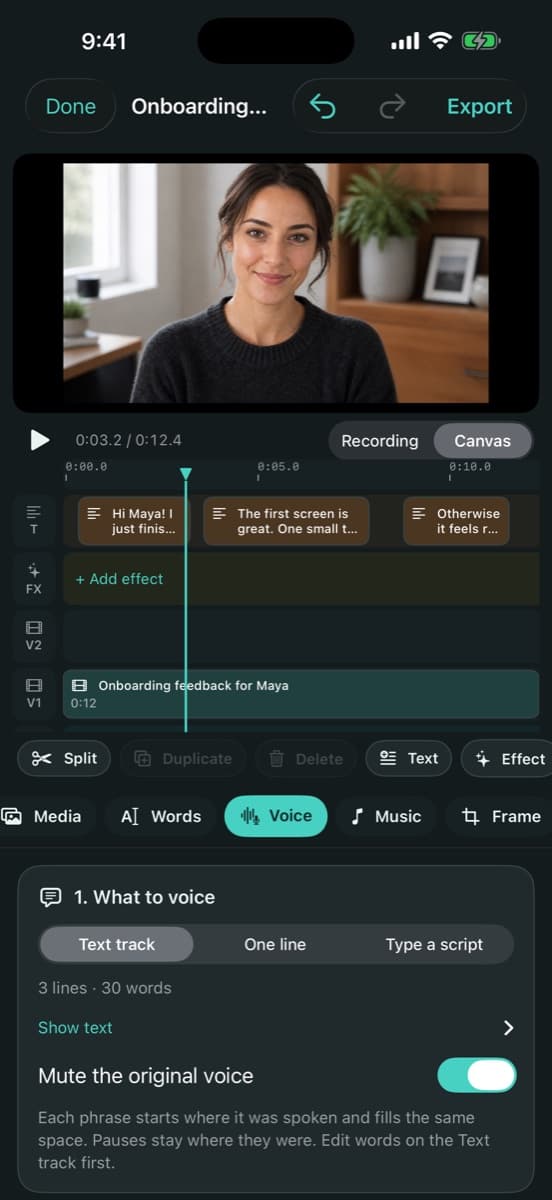
Video editor → Voice tab → Voice-over → Text track
How to do it
Transcribe the recording from the Text track card in the Edit tab, so the Text track holds what you said.
Fix any words on the Text track. The new voice says exactly what is there.
In the Voice tab, choose Text track under What to voice and turn on Mute the original voice.
Pick a voice with Choose…, then press Generate voice-over.
If generating is blocked, press Fix overlaps or Fit length to text under the button, then try again.
Good to know
- Pauses stay where they were. Text with estimated timing is placed less exactly; transcribe again to time it from the speech.
- After you edit a line, the take is marked as made with earlier text. Voice that line again with One line.
- Who can use it
- Uses credits; needs sign-in
- Where it works
- Mac · iPhone · Web
This guide answers
- Can I replace my voice in a recording with an AI voice?
- How do I re-voice my narration without re-recording?
- Can the AI voice keep my original timing?
- How do I mute my own voice under the voice-over?
- Why does it say Fix overlaps before I can generate?