Home / Help / Files, clipboard & photos Files, clipboard & photos
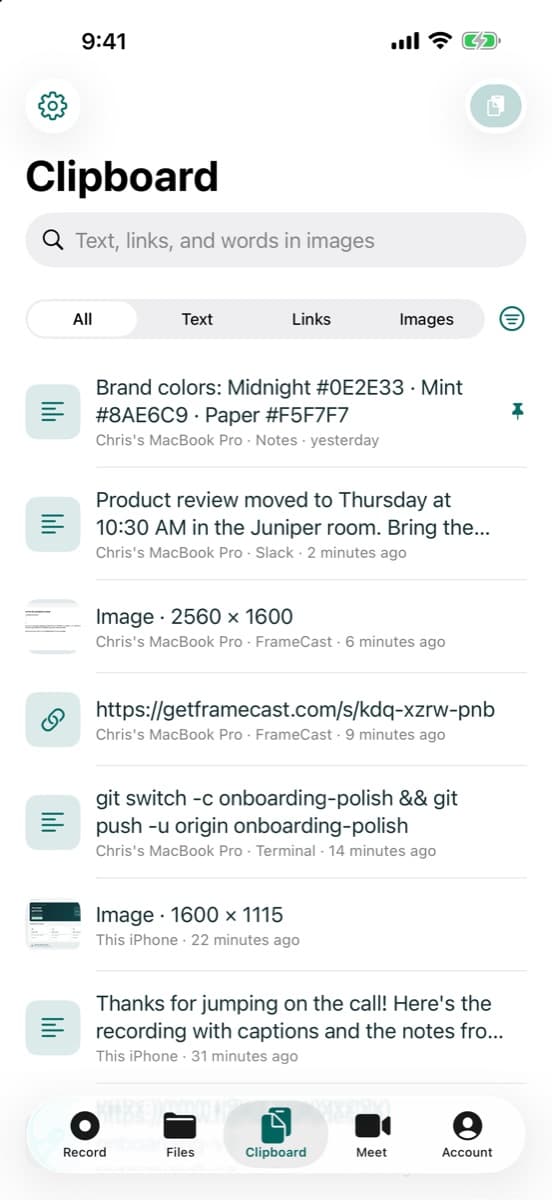
Sync your clipboard between Mac and iPhone See what you copy on your Mac on your iPhone, and send what you paste on your iPhone back to the Mac. It's encrypted with a key only your devices have.
Where to find it Mac: Studio → Clipboard → Sync with iPhone ; iPhone: Clipboard tab → Scan Code
How to do it 1 On the Mac, open the studio's Clipboard page and turn on Sync with iPhone .
2 Press Pair iPhone… to show a code.
3 On the iPhone, open the Clipboard tab and tap Scan Code , then scan it.
4 Copy something on the Mac. It shows up on the iPhone. Use the paste button on the iPhone to send something back.
Good to know Text, links, and images sync. Copied files stay on the Mac, and images count toward your storage. Only show the code to your own devices. To turn sync off, use Turn Off Sync… on the iPhone or the switch on the Mac.
Who can use it Pro or Team
Where it works Mac · iPhone This guide answers How do I get my Mac clipboard on my iPhone? How do I pair my iPhone with the FrameCast clipboard? Is the synced clipboard encrypted? Is this like Universal Clipboard? How do I turn off clipboard sync? Related guides Use clipboard history on your Mac
FrameCast saves what you copy, including text, links, images, and files, so you can search it and paste it again. Lock it with a PIN if others use your Mac.
Control your Mac from your iPhone
See your Mac's screen on your iPhone and use its mouse and keyboard, over Wi-Fi or cellular, from anywhere.
Join a meeting with a code or link
Open the meeting link, or type its code, to join from a browser, the Mac app, or the iPhone app. Guests type a name and join without an account.
Turn team features on or off
Hide what your team doesn't use, such as recording, meetings, or the clipboard, for everyone working in the team on the web, Mac, and iPhone.
Still stuck? Support covers install, permissions and how to send feedback from the app.
All help guides · More on files, clipboard & photos · Workflow guides · FrameCast home
Help us measure our ads? With your permission, Meta and Trybe receive visits to our marketing pages and browser identifiers. Meta receives confirmed Pro or Team purchase amounts; Trybe receives paid checkout amounts to credit creators for sales. Recording and editing work either way. You can change your choice anytime. Privacy details
No thanks Allow ad measurement
Global Privacy Control is honored automatically.
 FrameCast